Entity Portrait Canvas
Portray each entity-role: context, goals, pressures, potential, and the gains they seek
The problem this canvas solves
Platform design needs a consistent, deep picture of each entity-role: their context, their goals and performance pressures, their potential, and the gains they seek in connecting with others. Portraying entities differs from traditional persona research - portraits are made per entity-role cluster, not per individual, and focus on relationship potential rather than demographics.
When to use it
Use the Entity Portrait after clustering entities into roles: capture the entity's context, its goals and pressures, its potential, and the gains a platform experience must provide - including the access and reach gains that hint at the niche relationships worth intermediating.
The canvas
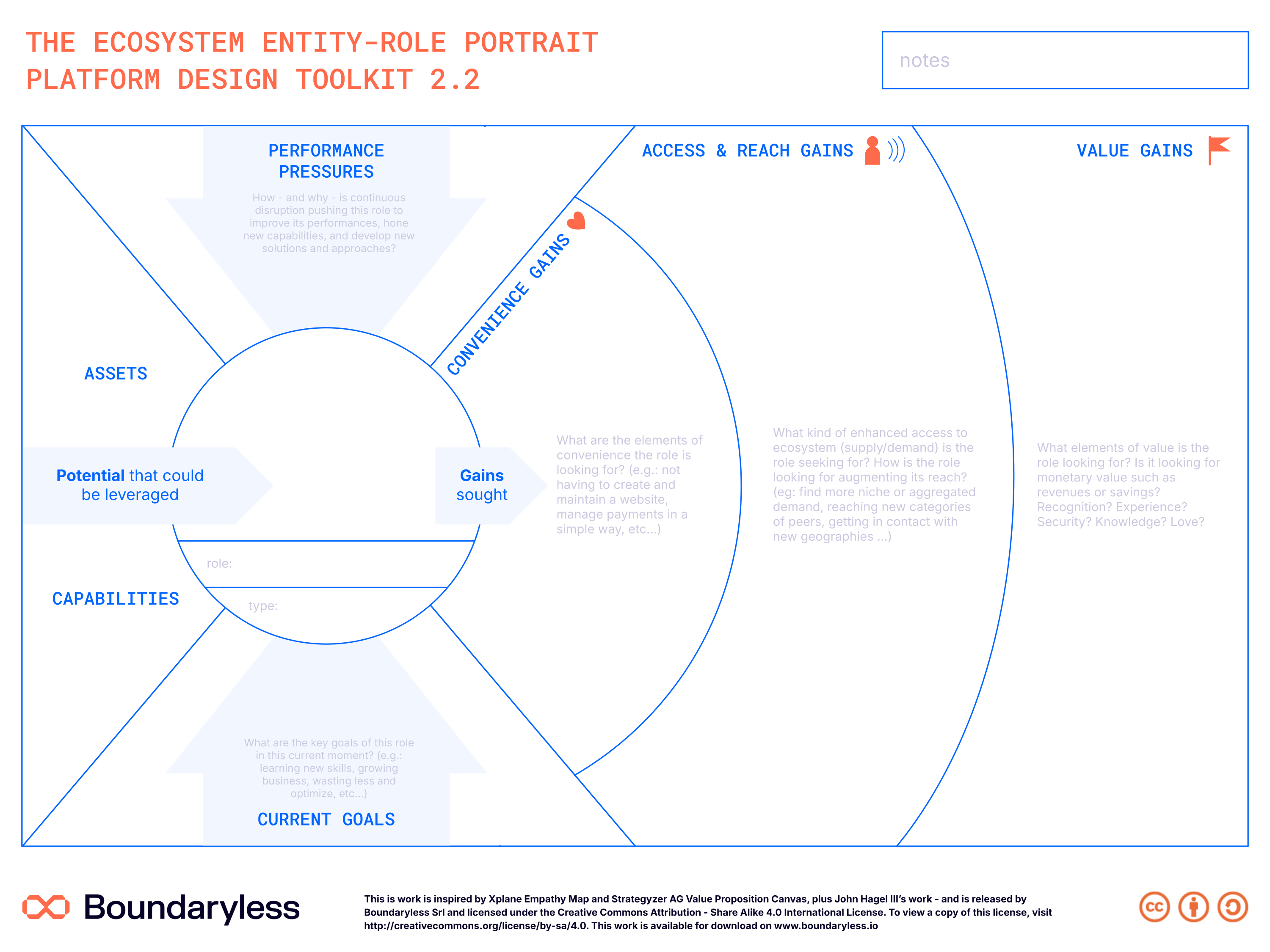
The canvas in the updated Boundaryless brand (full resolution — click to zoom). A print-ready PDF and editable SVG are also available on request.
Canvas structure
Context
The entity-role's environment, tools, constraints and daily reality - what their current experience looks like.
Goals & Performance Pressures
What the entity is trying to achieve, and the mounting pressures (the 'compressors') it must cope with.
Potential
The potential the entity can express - its growth trajectory and possible evolution.
Gains sought (convenience / reach / value)
The experience gains the entity is looking for: easier-faster-cheaper ways of doing things, finding their 'other half of the apple', and gaining more value while expressing their potential.
How to use it
Make a consistent, deep picture of each entity-role - context, goals, potential - to understand the experience gains they're looking for and that you should provide as a platform shaper.
Steps
- Whole canvas — Start with the entity-role most interesting for your design challenge - for whom are you designing in the first instance?
- Potential first — Start from the potential, then move into the compressors (goals and performance pressures), and only then the gains.
- Convenience gains — Capture any easier, faster, cheaper way to do things compared to the current situation - the part of the strategy that most resembles a solution to a problem.
- Reach gains — Ask: what is the 'other half of the apple' these entities are seeking? What's the perfect counterpart, and which dimensions matter to find their niche?
- Whole canvas — Map what entities are looking for in their current experience, not the gains you plan to offer - keep the focus outside-in.
Tips
- Portraits are of loose role-clusters, not individuals: don't force persona-level detail - you're designing a value proposition for a wide spectrum of participants.
- Run informal, open-ended interviews with representatives of your entity groups - or have them participate in the mapping.
- A strategy that sustains participants while letting them express their potential generates the pull factor.
- What you end up with: a clear understanding of the entities' context (you've worn their clothes) plus a raw idea of your multi-sided value propositions.
Connections with other canvases
Feeds into
- Motivations Matrix Canvas — Portraits inform motivation analysis
- Platform Experience Canvas — Entity understanding guides experience design
Informed by
- Ecosystem Canvas — Ecosystem design identifies key entities
- Ecosystem Scan Canvas — Scan provides entity context
Used in techniques
Used in pipelines
Related reading
- Defining the Platform Experience, and Flywheels for Defensibility — Shows how Entity Portraits feed into Motivations Matrix and Experience design
Resources
- Guide reference: PDT Strategy Design Guide - Entity Portrait chapter
- License: Creative Commons Attribution - Share Alike 4.0 International
- Version: 2.2
Canvas · Part of Platform Design Toolkit · v2.2