Arena Scan Canvas
Break the ecosystem down into arenas - systemic jobs-to-be-done - and choose where to focus
The problem this canvas solves
A whole ecosystem is too broad to explore at once. The Arena Scan reduces this complexity by breaking the ecosystem down into arenas - sets of related systemic outcomes (jobs-to-be-done) - mapped on an enabling/enabled, before/after grid, with a FOCUS area capturing your own perspective of enablement. Entities and players are mapped later, on the Ecosystem Scan.
When to use it
Use the Arena Scan at the very start of exploration to hypothesize what the ecosystem looks like, decompose it into arenas via systemic jobs-to-be-done, and pick the focus arenas whose steps will feed the Ecosystem Scan. Note: the FOCUS area does not mean "the most important arenas in the ecosystem" - it reflects your perspective of enablement.
The canvas
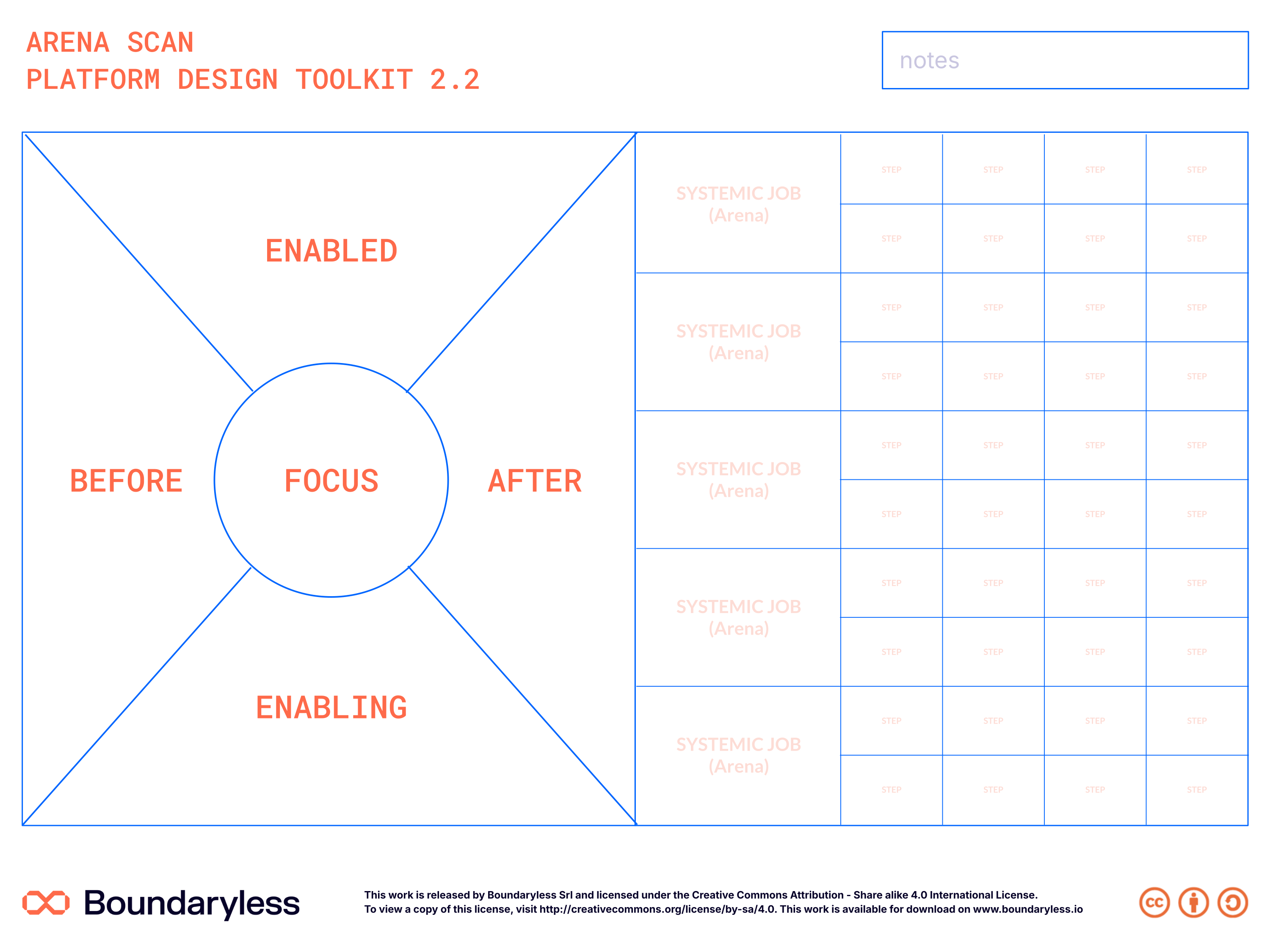
The canvas in the updated Boundaryless brand (full resolution — click to zoom). A print-ready PDF and editable SVG are also available on request.
Canvas structure
Arenas map (left area)
Hosts the arenas identified in the ecosystem: sequential phases along the horizontal axis (before-after), enabled arenas at the top, enabling resources at the bottom.
FOCUS area (center)
Where you place the arenas of interest - your qualitative perspective of enablement, explicitly not 'the most important arenas in the ecosystem'.
Steps expansion (right area)
Expands each focus arena into its steps - the interactions between a few entities - which become the experiences mapped in the Ecosystem Scan.
How to use it
A qualitative, highly iterative decomposition: Ecosystem to Arenas (from systemic jobs-to-be-done) to steps of the systemic interaction, continuously re-clustering as better logical continuity emerges from team discussion and domain-expert feedback.
Steps
- Arenas map — List all the arenas of your knowledge - phases (before/after or cause/effect relationships) or enabling/enabled clusters of systemic-outcome jobs.
- Arenas map — Place sequential phases along the horizontal axis (before-after); arenas enabled by underlying ones at the top, enabling resources and components at the bottom.
- FOCUS area — Identify the focus arenas and place them close to the center - e.g. by dot voting, or marking where you have direct interest, expertise or control.
- Steps expansion — Starting from the FOCUS arenas in priority order, list all their steps - the interactions between a few entities.
- Steps expansion — Use Ulwick's universal job map (Define-Locate-Prepare-Confirm-Execute-Monitor-Modify-Conclude) as loose guidance, always in systemic-outcome terms.
Tips
- The FOCUS area is not 'the most important arenas' - there may be higher-value arenas, but if you can't act on them, focus on what you can exploit.
- Size heuristic: arenas rarely involve more than ~10 roles; steps usually 2-5 entities - a step with 20 entities should be unbundled or promoted to arena.
- Unbundling-rebundling is iterative: re-cluster arenas by recurring entities, logical contiguity, and domain-expert feedback.
- Describe the ecosystem textually first; if you know one arena, add what happens before and after it, what generates its inputs and where outputs go.
- What you end up with: a preliminary picture of the arena landscape - to be challenged in the next steps - with all the elements for the Ecosystem Scan.
Connections with other canvases
Feeds into
- Ecosystem Scan Canvas — Arena insights inform ecosystem mapping
- Brief Consolidation Canvas — Arena analysis feeds strategic brief
Complements
- VRIO Analysis Canvas — Arena scan and VRIO together assess competitive position
Used in techniques
Used in pipelines
Related reading
- The Macro-Problems and Techniques of Platform Design — Explains the Arena Scan as part of Macro-Problem 1: Understanding Ecosystems
Resources
- Guide reference: PDT Opportunity Exploration Guide - Arena Scan chapter
- License: Creative Commons Attribution - Share Alike 4.0 International
- Version: 2.2.1
Canvas · Part of Platform Design Toolkit · v2.2.1