Platform Design Canvas
Comprehensive canvas for designing platform strategy and architecture
The problem this canvas solves
Applying platform thinking means designing a System of Value Creation that can be represented as a Transactions/Relationships engine and a Performance Improvement/Learning engine. Teams need a comprehensive view that captures both the "transactions engine" (how value exchanges happen) and the "learning engine" (how the platform and its participants continuously improve). The Platform Design Canvas provides this unified view, mapping entities, value propositions, channels, services, and business model in a single artifact.
When to use it
Historically the toolkit's synthesis view, the Platform Design Canvas is today used less and less as a design tool: the community mostly uses it as a dashboard - a quick recap of a platform strategy, or a fast way to explore platform potential without running the full process. For actual design work, the step-by-step canvases (Ecosystem, Entity Portraits, Motivations Matrix, Transactions Board, Learning Engine, Platform Experience) do the heavy lifting.
The canvas
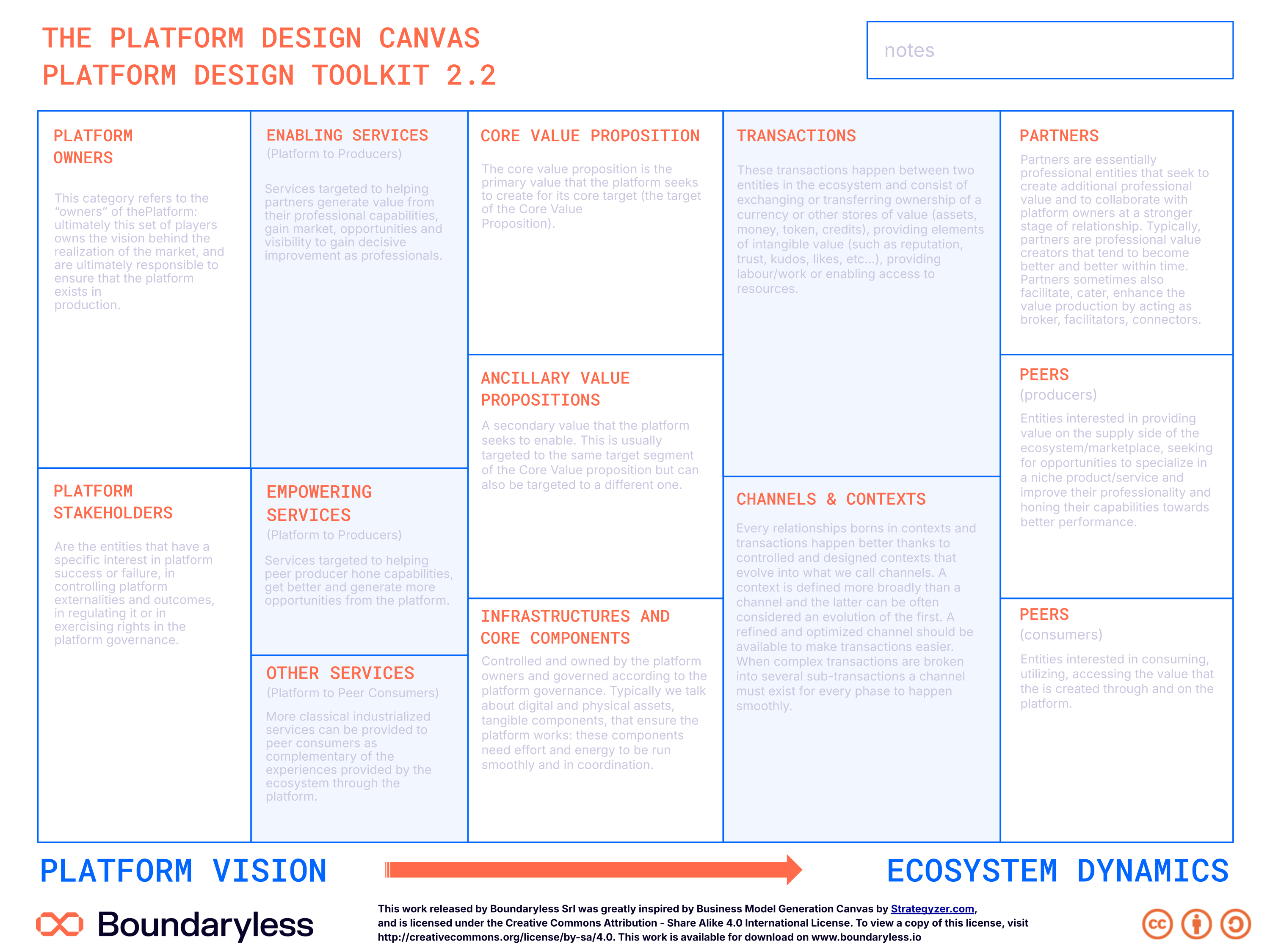
The canvas in the updated Boundaryless brand (full resolution — click to zoom). A print-ready PDF and editable SVG are also available on request.
Canvas structure
Consolidation areas
Areas where you consolidate, in one sheet, the insights generated with the toolkit from step 1 (Ecosystem Canvas) through step 6 (Learning Engine).
One-sheet strategy recap
Used as a dashboard providing a quick recap of the ecosystem potential and the platform strategy.
How to use it
The guide uses the Platform Design Canvas less and less as a design tool; the community plays with it mostly as a dashboard - a quick recap of the strategy, or a fast way to explore platform potential without the full process.
Steps
- Consolidation use — Consolidate step by step the insights you generate with the toolkit (especially steps 1 to 6) into the canvas.
- Quick-brainstorm use — Alternatively, grab a PDC and quickly brainstorm - or map an existing platform strategy - on one single sheet.
- Recap use — Use it as a dashboard recapping the ecosystem potential and the platform strategy.
Tips
- Treat it as a dashboard, not a primary design tool - the step-by-step canvases do the design work.
- It works well for quickly exploring platform potential without diving into more complex processes.
- What you end up with: a single-sheet dashboard recapping the ecosystem potential and the strategy consolidated from the other canvases.
Connections with other canvases
Feeds into
- Minimum Viable Platform Canvas — Design informs MVP scoping
- Platform Experience Canvas — Design guides experience decisions
- Liquidity Canvas — Design informs liquidity strategy
Informed by
- Ecosystem Canvas — Ecosystem is foundation of platform
- Motivations Matrix Canvas — Motivations inform value propositions
- Transactions Board Canvas — Transactions define platform mechanics
- Brief Consolidation Canvas — Strategic brief guides design
Complements
- Learning Engine Canvas — Learning engine is platform capability
Used in techniques
Used in pipelines
Related reading
- The Elements of the Platform Organization — Explains the Two Essential Engines of Platforms that the canvas maps
- Platforms are Engines of Learning — Foundation for understanding the learning engine portion
Resources
- Guide reference: PDT Strategy Design Guide - Platform Design Canvas chapter
- License: Creative Commons Attribution - Share Alike 4.0 International
- Version: 2.2
Canvas · Part of Platform Design Toolkit · v2.2